.png?width=2196&height=2196&name=OS%20(1).png)



.svg)

-3.png?width=224&height=213&name=Accelerate%20(2)-3.png)









At Cents, we're committed to building tools that help laundromat operators serve every customer who walks through the door or places an order online. That's why we're excited to announce that Cents now supports international phone numbers.
Starting today, you can add customers with international phone numbers directly in the Business Manager, and those customers can place orders through your Live Link using their number from anywhere in the world.
What's New
International phone number support is now live across two key areas:
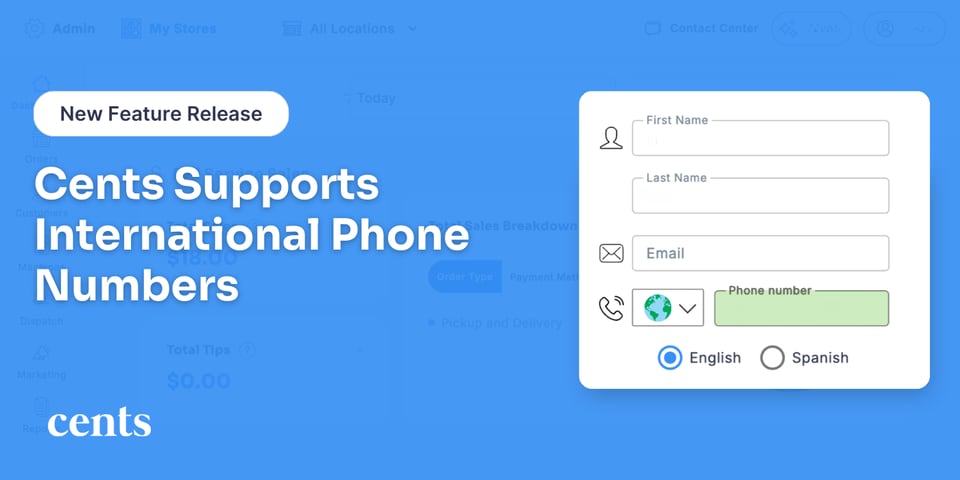
Customer Profiles in Business Manager: When creating a new customer, simply select the country from the dropdown and enter the phone number. The country code flag updates automatically as you type, or you can select it manually. The recommended format when copying and pasting is +[country code][number] (example: +442071838750).
Online Ordering via Live Link: International customers can now enter their phone number on your Live Link to place orders and receive a one-time passcode (OTP) for verification, just like domestic customers. If their country supports SMS through our Twilio integration, the code will be sent by text. If SMS is not available for their country or number, customers will have the option to receive their verification code by email instead so the ordering experience remains seamless.
SMS Support Varies by Country
Not all countries support two-way SMS, and some have limitations on the type of messaging that can be delivered. Here's a quick breakdown of what to expect:
-
Two-way SMS: The customer can receive texts from you and reply back. Best for ongoing communication.
-
Outbound-only: The customer can receive order updates and notifications, but cannot reply via SMS. Great for transactional updates, but not conversations.
-
Not available for messaging: The number can still be saved in the customer profile, but SMS and OTP delivery will not work. In these cases, customers can use email for verification on the Live Link.
Where to Go from Here
To get started, head to the Business Manager and create a new customer using the plus sign. Select the country, enter the phone number, and save.
For a full list of countries and their SMS support status, including which support two-way texting and which are outbound-only, visit our Help Center.

If you run into any issues with OTP delivery or customer verification, the Help Center article also includes a step-by-step troubleshooting checklist to help you resolve common problems quickly.
We're excited to bring more of your customers into the Cents experience, no matter where they're located!